ai-sdk-harness-approval
An approval policy for AI SDK harness agents: commands and edits allowed, asked or denied by rule, "always allow" for a session, and the agent's questions answered.
A person in the loop of AI SDK harness agents: an approval policy for Claude Code, Codex and the other runtimes HarnessAgent drives. What looks around runs at once, what you forbid is refused with a reason the agent reads, the rest waits for a person — who can always allow it for the rest of the session. And the agent's questions, answered from a form.
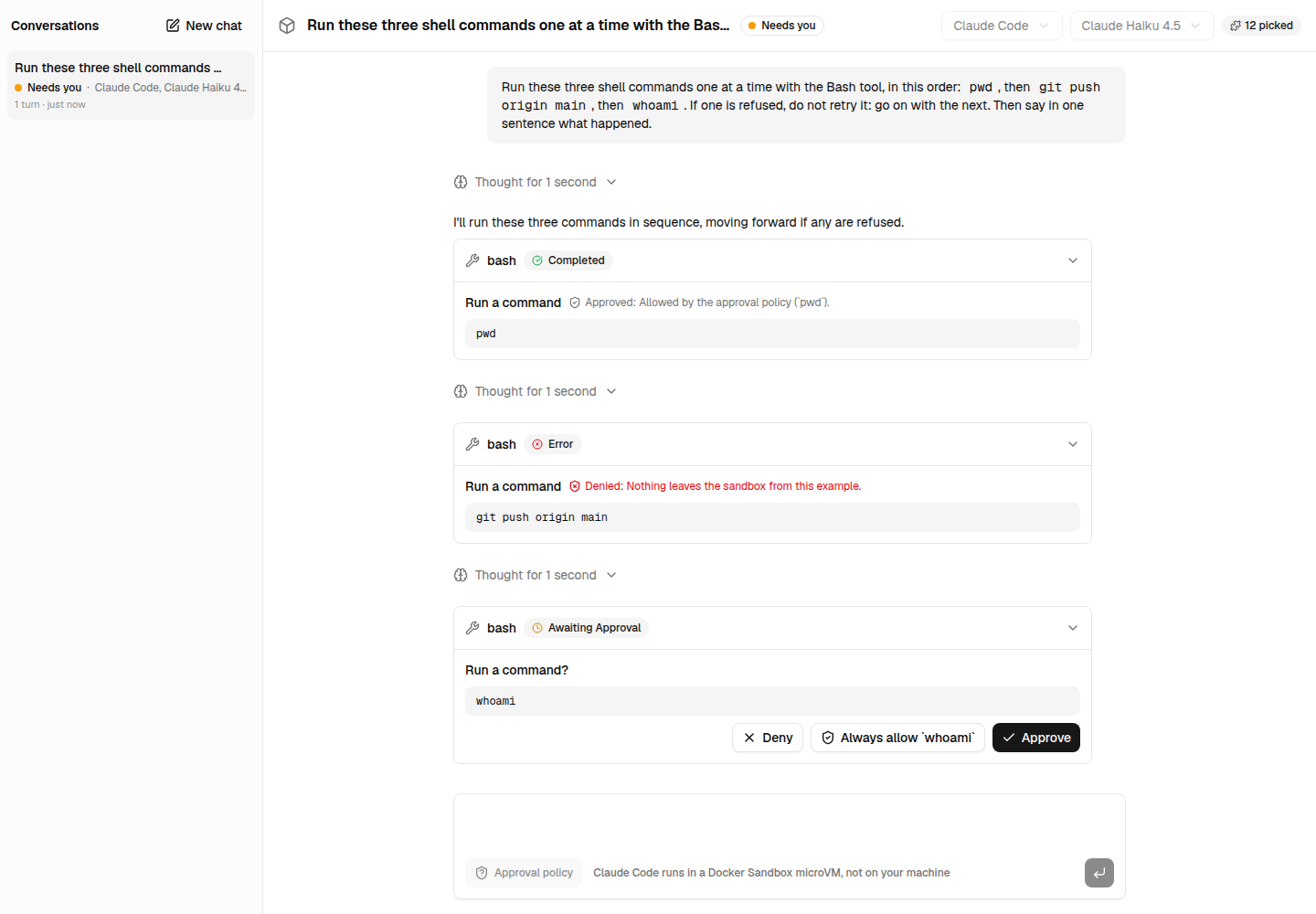
At a glance
HarnessAgent takes a permissionMode for the runtime's own tools — ask about edits and commands, or about nothing — and a toolApproval map for yours. Every approval it asks goes to a person. A policy decides most of them instead:
import { HarnessAgent } from '@ai-sdk/harness/agent';
import { defineApprovalPolicy } from 'ai-sdk-harness-approval';
import { createSessionManager } from 'ai-sdk-harness-sessions';

const policy = defineApprovalPolicy({
  commands: {
    allow: ['ls', 'cat', 'git status', 'git diff', 'pnpm test'],
    deny: [{ match: 'git push', reason: 'The application publishes the changes.' }, 'rm -rf'],
  },
  edits: { allow: ['src/**'], deny: ['.env*'] },
  tools: { deployPreview: 'ask' },
});

// The agent asks about what the policy may restrict...
const agent = new HarnessAgent({ harness, model, ...policy.agentSettings(harness) });

// ...and the policy answers, within the turn, before anyone sees it.
const sessions = createSessionManager({
  agent: () => agent,
  sandboxes,
  approve: policy.approver({ grants: ({ session }) => session.metadata.grants }),
});| The agent wants to | What happens |
|---|---|
Run git status --short | Allowed at once, in the same turn: the client shows "Allowed by the approval policy (git status)" |
Run cd app && rm -rf dist | Refused: each command of a chain is held to the rules, and the agent is told why |
Run curl https://example.com | Asked: the session waits for a person, with "Always allow curl" next to Approve and Deny |
Write src/app.ts, then .env | The first allowed by the path rules, the second refused |
| Update its to-do list | Allowed: the agent's own bookkeeping never asks, unless the policy says otherwise |
Call your deployPreview tool | Asked, as tools says: your tools ask only when listed |
Ask you a question (AskUserQuestion) | Waits for your answers, from QuestionsForm; a session resumed meanwhile tells the agent the answers |
Installation
pnpm add ai-sdk-harness-approval@ai-sdk/harness and ai are peer dependencies. It runs in the browser too: the components that show the requests use its helpers. ai-sdk-harness-sessions answers within the turn; without it, see Without a session manager.
Usage
The policy
const policy = defineApprovalPolicy({
  commands: { allow: [...], ask: [...], deny: [...], default: 'ask' },
  edits: { allow: [...], ask: [...], deny: [...] },
  tools: { webSearch: 'allow', deployPreview: 'ask', dropDatabase: { decision: 'deny', reason: 'Never.' } },
  default: 'ask',
});
Each rule is a pattern, or { match, reason }; the reason is what the agent is told when it denies a call. In a rule set, the most restrictive matching rule wins — deny, then ask, then allow —, and default decides what no rule matches. See How rules read.
policy.evaluate({ toolName, input }) tells what it makes of a call — { decision, reason, rule } —, for a test or a log.
The agent's settings
policy.agentSettings(harness) gives the settings of a HarnessAgent that make it ask what the policy decides, to spread into its own:
permissionMode: the least permissive the policy needs.allow-readswhen it may restrict edits (Claude Code asks about every edit and command),allow-editswhen it restricts commands alone,allow-allwhen it restricts neither.toolApproval: your tools listed intools,user-approvalordenied.
A harness that cannot ask before using its own tools — Codex today — gets allow-all, and policy.warnings(harness) says which rules it does not follow. Rules on your own tools still apply.
With a session manager
policy.approver() is the approve option of createSessionManager(). An approval it decides is answered at once, and the turn goes on in the same stream: the client sees the request, its answer and the reason, then what the agent did. One it leaves to a person keeps the session awaiting-input, until continue() brings the answer.
Its grants option reads the grants of the session from what the manager passes: { session }, its metadata included.
Always allow
A person who approves a call can allow the same for the rest of the session. suggestGrant(request) says what to grant, and how a button says it:
| The call | The grant | The button |
|---|---|---|
bash: npm test -- --watch | { kind: 'command', prefix: 'npm test' } | Always allow `npm test` |
bash: cd app && git push | cd and git push, one grant each | Always allow `cd`, `git push` |
Write: src/app.ts | { kind: 'edit' }, every file edit | Always allow file edits |
Any other tool, webFetch | { kind: 'tool', toolName: 'webFetch' } | Always allow webFetch |
Keep the grants with the session — sessions.update(id, { metadata }), merged with withGrants() — and give them back through grants. A grant allows what the policy would ask about, never what it denies: granting git push changes nothing when a rule denies it. A command that writes to a file through a redirection is never allowed by a grant either.
Without a session manager
A route that drives HarnessAgent itself answers with policy.answer(): the approval responses of what it decides, and the requests left to a person.
const { responses, remaining } = policy.answer(pendingApprovals, { grants });
if (remaining.length === 0) {
  return agent.continueStream({ session, toolApprovalContinuations: responses });
}
The agent's questions
Claude Code's AskUserQuestion reaches you as a call of the tool askUserQuestions (QUESTIONS_TOOL_NAME): its input, AgentQuestions, holds the questions and their options, and the turn waits for its output, AgentAnswers. answersOf(questions, selection) builds the output from what a form picked — answered, partially-answered when the questions allow it, declined when nothing was —, isComplete() says whether it can be sent, and describeAnswers() says it in words.
The components
ToolApproval and QuestionsForm are shadcn/ui components, in the registry of this site:
npx shadcn@latest add https://ai-sdk-harness.pages.dev/r/tool-approval.json
npx shadcn@latest add https://ai-sdk-harness.pages.dev/r/questions-form.json
ToolApproval shows a tool call that asked approval — "Run a command?", the command — with Deny, Always allow and Approve; once answered, its verdict and why. QuestionsForm shows the agent's questions, and gives their answers. See the components.
How rules read
Commands are matched word by word from their start: git push matches git push origin main, not git pushy; * matches anything, npm run test:*. Before matching, the policy reads the script into its simple commands:
- A chain —
&&,||,;,|,&, a new line, a subshell — is allowed only when each of its commands is; one denied command denies it all. - Command substitutions,
$(…), backquotes,<(…), are commands of their own, quoted or not:echo "$(rm -rf /)"is denied byrm -rf. - Leading variable assignments, keywords (
if,!,{…) and the path of the command are dropped:NODE_ENV=test /usr/bin/node app.jsreadsnode app.js. - A command that writes to a file through a redirection —
>,>>,&>, other than to/dev/nullor a descriptor — is asked about at least, whatever allows it.
Edits are matched by path, as .gitignore reads them: a glob without a slash, .env*, matches a file name in any directory; one with a slash, src/**, the end of the path, whatever directory the session works in. . and .. are resolved first. The edit tools are write, edit, MultiEdit and NotebookEdit.
Tools listed in tools are decided outright, before any other rule, by the name the stream gives them: a built-in tool of the harness (bash, webSearch, TodoWrite) or one of yours.
Bookkeeping — Claude Code's TodoWrite, tasks and plan mode — is allowed unless tools says otherwise: Claude Code asks about them in allow-reads.
Harnesses
| Runtime | Its own tools | Your tools |
|---|---|---|
| Claude Code | Commands and edits asked about, the policy deciding. Reads are never asked about | Through tools |
| Codex | Not asked about: it runs them freely (vercel/ai#22550) | Through tools |
Reference
| Export | What it does |
|---|---|
defineApprovalPolicy(settings) | Reads a policy once: an ApprovalPolicy |
policy.evaluate(request, { grants }) | { decision, reason?, rule? } for one call |
policy.agentSettings(harness?) | { permissionMode, toolApproval } for HarnessAgent |
policy.warnings(harness) | The rules harness does not follow |
policy.answer(requests, { grants }) | { responses, remaining }: what a route continues a turn with |
policy.approver({ grants }) | The approve option of createSessionManager() |
suggestGrant(request) | { grants, label }: what "Always allow" grants |
withGrants(grants, added) | The grants with added, each once |
describeGrant(grant) | "`npm test` commands", "file edits" |
describeToolCall(request) | { kind, title, detail }: "Run a command", the command |
commandSegments(script), toolKindOf() | How the policy reads a script, and a tool |
answersOf(), isComplete(), describeAnswers() | The answers to the agent's questions |
Limitations
- A guard rail, not a sandbox. Rules read commands the way a shell mostly does, not the way it always does:
bash -c '…',xargs,find -execor a script the agent wrote run what they run. Allow what you trust — an allow list holds better than a deny list — and keep the agent in a sandbox: it is the boundary. - Only what the runtime asks about. Claude Code asks about commands and edits, never about reads: a rule on
readorgrepdoes not apply. Codex asks about none of its own tools (vercel/ai#22550). - Approvals after a resume, with Claude Code. A resumed Claude Code session does not take the answers to its approvals, and asks again (vercel/ai#22549). The session manager leaves such a repeated approval to a person rather than answer it forever; a session that never resumed is not concerned.
Development
pnpm --filter ai-sdk-harness-approval test:e2e runs a policy against real Claude Code sessions in a Docker Sandbox: a command allowed within the turn, one refused, one asked then always allowed, and the agent's questions answered; it needs sbx signed in and a Claude credential. See CONTRIBUTING.md.
License
ai-sdk-harness-sessions
Sessions for AI SDK harness agents: suspended when idle, resumed on the next message and after a restart, waiting for an approval, several in one sandbox.
Next.js chat
A useChat page talking to Claude Code or Codex, running in a local Docker Sandbox or a Cloud Run sandbox, with plugins.