Approving tool calls
Keep a person in the loop with ai-sdk-harness-approval — a policy that allows, asks about or refuses the agent's commands and edits, "always allow" for a session, and the agent's questions.
This guide starts from the chat of Managing sessions and puts a person in its loop: the agent's harmless commands run at once, the ones you forbid are refused, and the rest wait for the user — who can allow them for the rest of the conversation. Every rule is in the package's documentation.
Install the package
pnpm add ai-sdk-harness-approvalWrite the policy
What runs at once, what is refused, and what asks: the most restrictive matching rule wins, and default, ask unless you say otherwise, decides the rest.
import { defineApprovalPolicy } from 'ai-sdk-harness-approval';

export const policy = defineApprovalPolicy({
  commands: {
    allow: ['ls', 'cat', 'pwd', 'git status', 'git diff', 'pnpm test'],
    deny: [
      { match: 'git push', reason: 'The application publishes the changes.' },
      { match: 'rm -rf', reason: 'Nothing is deleted recursively.' },
    ],
  },
  edits: { deny: [{ match: '.env*', reason: 'Environment files stay as they are.' }] },
});
A command made of several, cd app && rm -rf dist, is held to the rules command by command, substitutions included; one that writes to a file with > always asks. See How rules read.
Make the agent ask
policy.agentSettings(harness) gives the agent the permission mode its policy needs: here allow-reads, Claude Code asking before each edit and each command.
const agent = new HarnessAgent({ harness, model, ...policy.agentSettings(harness) });Codex cannot ask before using its own tools yet (vercel/ai#22550): it gets allow-all, and policy.warnings(harness) says which rules it does not follow.
Let the policy answer
The approve option of the session manager asks the policy first. What it decides is answered at once, and the turn goes on in the same stream; what it leaves to the user keeps the session awaiting-input.
import type { ApprovalGrant } from 'ai-sdk-harness-approval';

export const sessions = createSessionManager<{ title: string; grants?: ApprovalGrant[] }>({
  agent: () => agent,
  sandboxes,
  approve: policy.approver({ grants: ({ session }) => session.metadata.grants }),
});
Show the requests
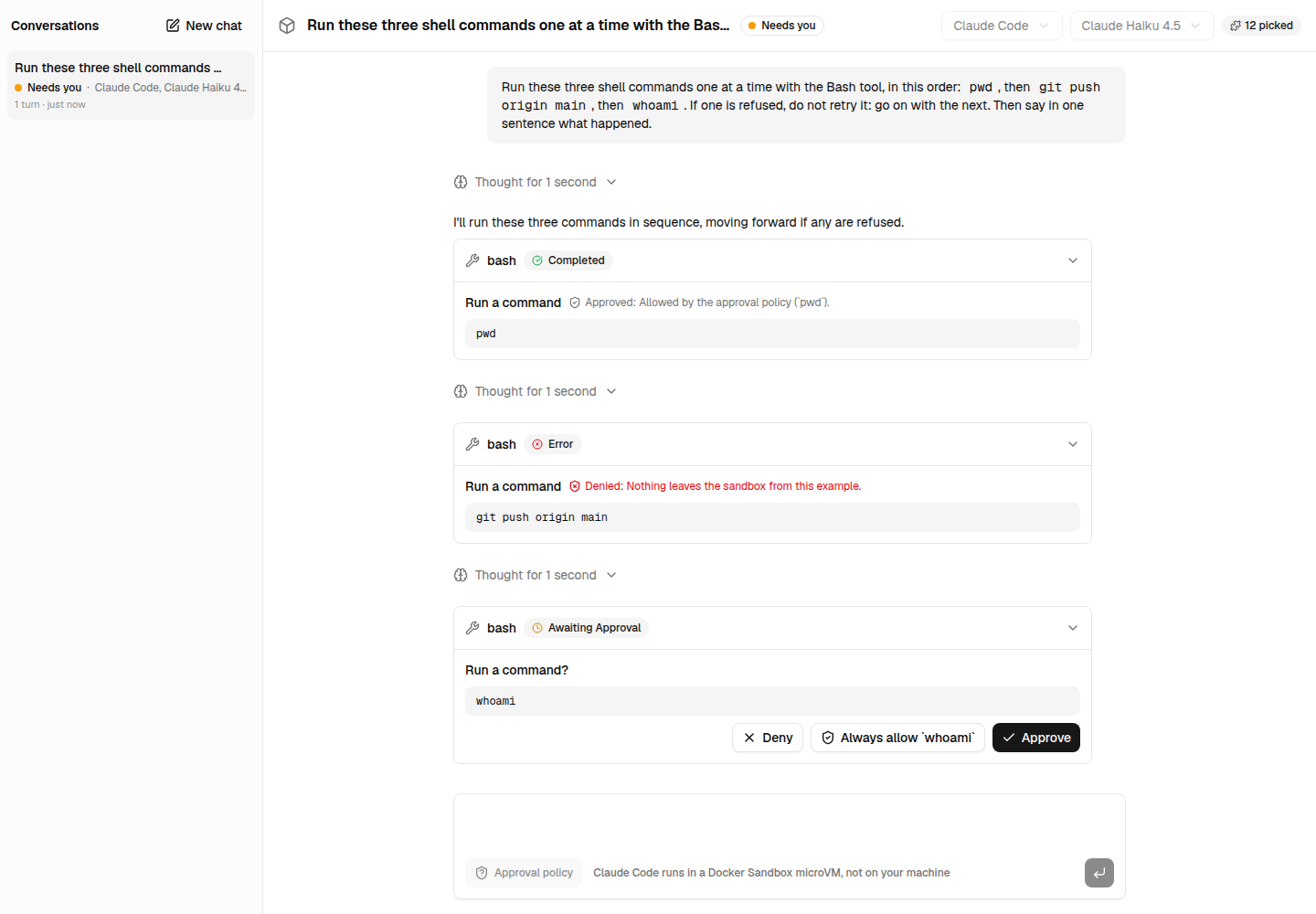
ToolApproval shows a tool call that asks — "Run a command?", the command — with Deny, Always allow and Approve, and the verdict once given, with its reason. Add it from the registry:
npx shadcn@latest add https://ai-sdk-harness.pages.dev/r/tool-approval.json<ToolApproval part={part} onRespond={respond} />respond keeps the grants of "Always allow" with the conversation, then answers:
async function respond({ approvalId, approved, grants }: ToolApprovalResponse) {
  if (grants)
    await fetch(`/api/sessions/${id}/grants`, { method: 'POST', body: JSON.stringify({ grants }) });
  addToolApprovalResponse({ id: approvalId, approved });
}import { withGrants } from 'ai-sdk-harness-approval';
export async function POST(request: Request, { params }: { params: Promise<{ id: string }> }) {
const { grants } = await request.json();
const session = await sessions.update((await params).id, {
metadata: (metadata) => ({ ...metadata, grants: withGrants(metadata.grants, grants) }),
});
return Response.json(session);
}A grant allows what the policy would ask about, never what it denies.
Answer the agent's questions
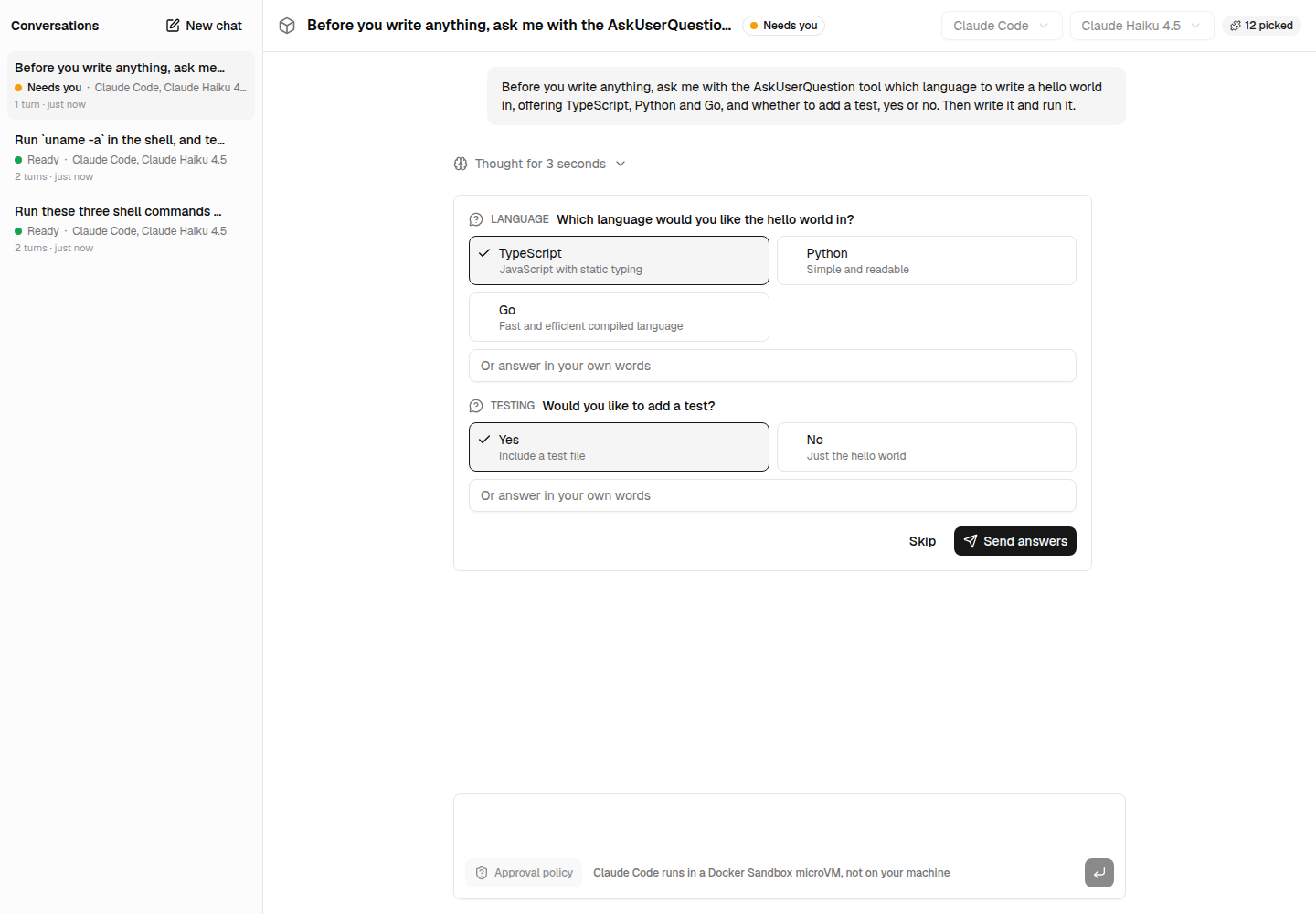
Claude Code asks its questions with AskUserQuestion: the turn waits for the answers. QuestionsForm shows them, and gives the answers as the tool's output:
<QuestionsForm
  questions={part.input}
  onSubmit={(output) =>
    addToolOutput({ tool: 'askUserQuestions', toolCallId: part.toolCallId, output })
  }
/>
useChat sends the conversation back once everything is answered, approvals and questions; the route continues the turn with sessions.continue(id, { message }). Send automatically only when the user answered something: an approval the policy answered within the turn is already taken care of.
const answered = useRef(false);
useChat({
  sendAutomaticallyWhen: ({ messages }) => {
    if (!answered.current) return false;
    const complete =
      lastAssistantMessageIsCompleteWithApprovalResponses({ messages }) ||
      lastAssistantMessageIsCompleteWithToolCalls({ messages });
    if (complete) answered.current = false;
    return complete;
  },
});
The rules are a guard rail, not a sandbox: bash -c, xargs or a script the agent wrote run what
they run. Allow what you trust, and keep the agent in a sandbox. A Claude Code session that
resumed after a suspension does not take the answers to its approvals
(vercel/ai#22549): the manager leaves such a repeated
approval to the user rather than answer it forever.
Next steps
- Every rule, the grants and the harnesses: the package's documentation.
- The components, and the Next.js example, where they run.
Managing sessions
Run your users' conversations with ai-sdk-harness-sessions — several in one sandbox, suspended when idle, resumed after a restart, waiting for approvals.
UI components
shadcn/ui components for harness agents — the approval of a tool call, with "Always allow", and the agent's questions — installed from this site's registry.